Halo Help? Originally called "Swordedit help?"
Moderator: Halo Moderators
Halo Help? Originally called "Swordedit help?"
I can't make teleporters in swordedit, and when I open the swordedit page, the map only has three lines and the background is black. How can I make teleporters?
Last edited by lolface on Fri Aug 28, 2009 6:15 am, edited 1 time in total.
"It's raining gumballs!"
From Bedtime Stories, a Disney production.
From Bedtime Stories, a Disney production.
Re: Swordedit help?
go to file>open>and select a map file
then you can make teleporters with that map file
then you can make teleporters with that map file
Re: Swordedit help?
Can you post the instructions, if you don't mind? I can't seem to do anything on swordedite except for move the camera around.
"It's raining gumballs!"
From Bedtime Stories, a Disney production.
From Bedtime Stories, a Disney production.
-
Rofldonutburger
- Commando
- Posts: 2468
- Joined: Wed Oct 29, 2008 1:38 am
Re: Swordedit help?
Do I have to explain this step by step...
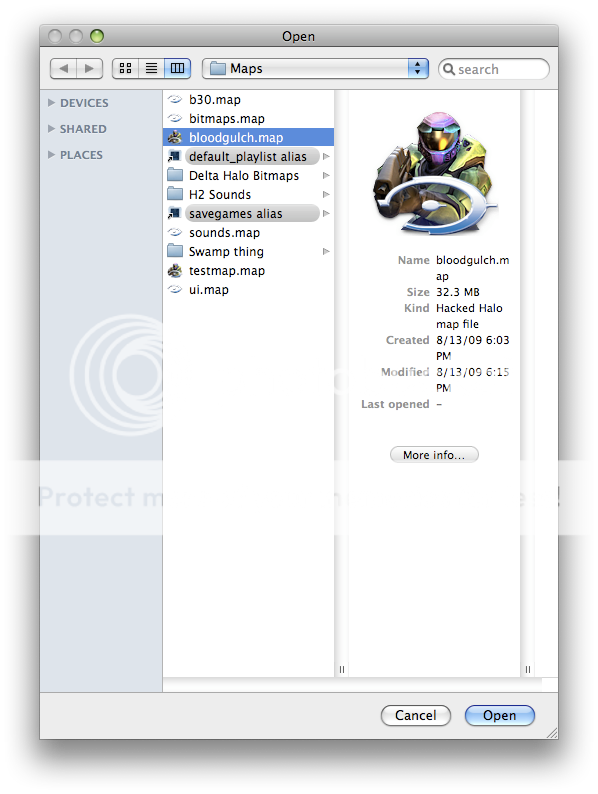
1. Open swordedit and select your map file. In this case, bloodgulch.map.
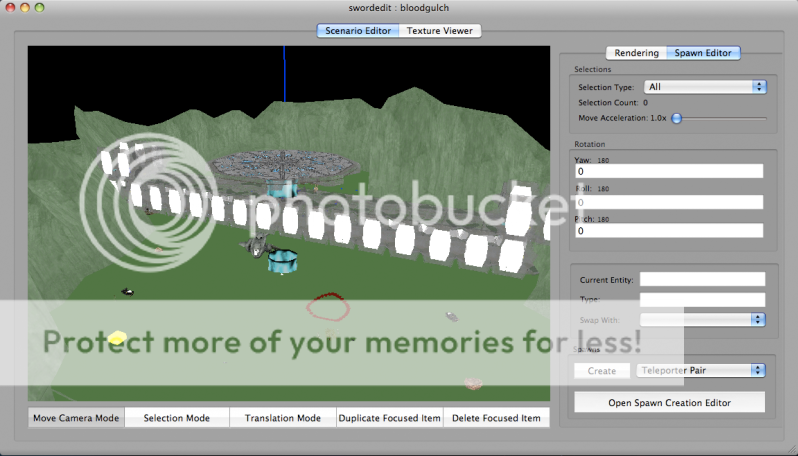
2. Now you should be able to see the map. Press W, A, S, D to move around and use Space bar and C to move up and down.
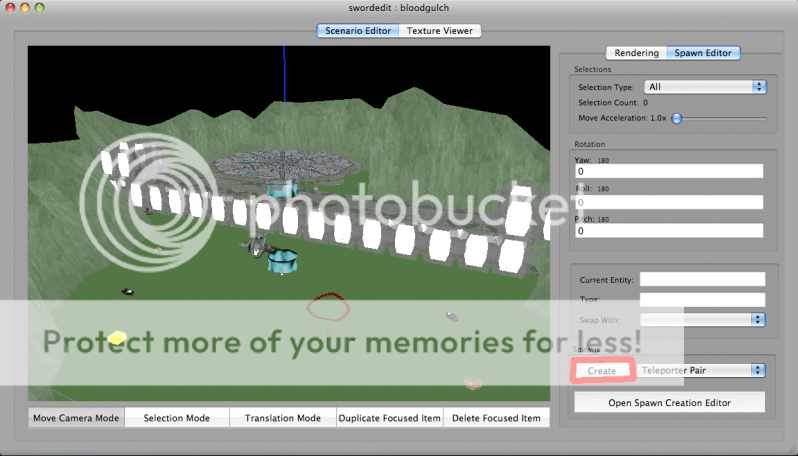
3. Now go to the place where you want to make a teleporter, and press "Create" on the bottom right corner.
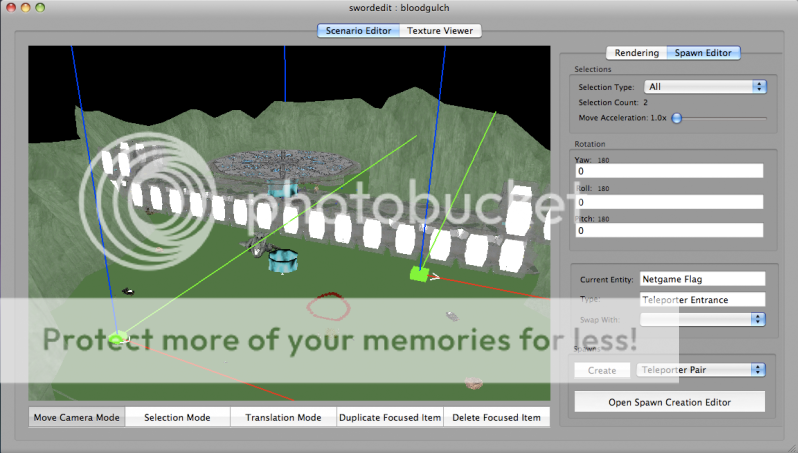
4. You should have created a teleporter exit and teleporter entrance. Select transition mode and move them both to the place you want them to be.
5. Now save, and quit swordedit. (Remember, quit after saving or the map will crash)
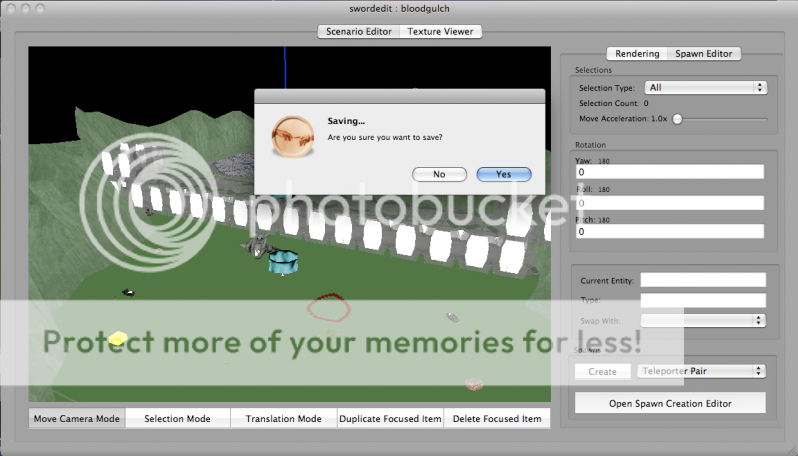
6. Try your mod in Halo Demo
1. Open swordedit and select your map file. In this case, bloodgulch.map.
2. Now you should be able to see the map. Press W, A, S, D to move around and use Space bar and C to move up and down.
3. Now go to the place where you want to make a teleporter, and press "Create" on the bottom right corner.
4. You should have created a teleporter exit and teleporter entrance. Select transition mode and move them both to the place you want them to be.
5. Now save, and quit swordedit. (Remember, quit after saving or the map will crash)
6. Try your mod in Halo Demo
Dead. derp
Re: Swordedit help?
yeah what rofldonutburger said, also what was that in sword edit?
-
Rofldonutburger
- Commando
- Posts: 2468
- Joined: Wed Oct 29, 2008 1:38 am
Re: Swordedit help?
What do you mean "go to the place you want the teleporter to be"? Does it mean move the cursor and click, or something else?
"It's raining gumballs!"
From Bedtime Stories, a Disney production.
From Bedtime Stories, a Disney production.
-
Rofldonutburger
- Commando
- Posts: 2468
- Joined: Wed Oct 29, 2008 1:38 am
Re: Swordedit help?
So I move the cam until the intersection of the three lines are on the point I want it to be?
"It's raining gumballs!"
From Bedtime Stories, a Disney production.
From Bedtime Stories, a Disney production.
-
Rofldonutburger
- Commando
- Posts: 2468
- Joined: Wed Oct 29, 2008 1:38 am
Re: Swordedit help?
Like what do you mean "move the camera"? Move it until what?
"It's raining gumballs!"
From Bedtime Stories, a Disney production.
From Bedtime Stories, a Disney production.
-
Rofldonutburger
- Commando
- Posts: 2468
- Joined: Wed Oct 29, 2008 1:38 am
Re: Swordedit help?
*Sigh* Ignore that part. Just create the teleports, and move them to your desired location.
Dead. derp
Re: Swordedit help?
Oh yeah, and after I load my bloodgulch.map, the map is still black except for three coloured lines. Your's had a map figure on it (step 1 or 2, forgot) mine only has black screen and three coloured lines.
"It's raining gumballs!"
From Bedtime Stories, a Disney production.
From Bedtime Stories, a Disney production.
-
Rofldonutburger
- Commando
- Posts: 2468
- Joined: Wed Oct 29, 2008 1:38 am
Re: Swordedit help?
I don't get you...
"It's raining gumballs!"
From Bedtime Stories, a Disney production.
From Bedtime Stories, a Disney production.
Who is online
Users browsing this forum: No registered users and 15 guests